
Aion 2 ESP: What the Overlay Shows and How to Tune It
An ESP is only as good as its filters. Here is exactly what the Aion 2 overlay can show, and how to strip it down to something you can actually read mid fight.
Abyss PvP rewards information before aim. ESP removes the moment you learn someone was there by dying.
What the player layer shows
Name, level, legion, title, faction, condition, distance, HP, shield, MP/AP, stamina and flight bars, with box, skeleton, tracers, look direction and line of sight toggles up to a 1,000 m cap.
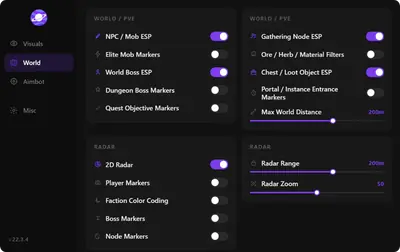
What the world layer shows
Resource nodes, chests, hidden cubes, traces, quest items, loot tiers, teleporters, portals, rifts, monoliths, groves, and jump pads—each with name, distance, and range.
Tuning it so you can actually see
- Pull player distance to ~300 m in the Abyss.
- Pick boxes or skeletons, not both.
- Keep line of sight on for honest reads.
- Turn world markers off until the session needs them.
- Use stream safe and the panic key when you broadcast.
Pair tuning notes with automation settings and setup order.